-
Replay the race
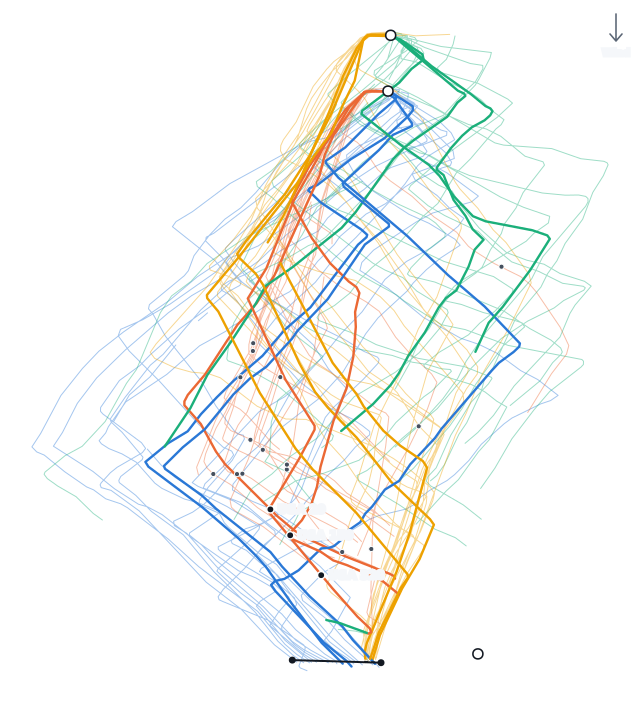
Play the whole fleet back on the course map at 1×, 4× or 16×, or scrub to any moment. Show a short trail behind each boat or its full track. You can zoom in or open the map full screen.
-
Track colors
Color the tracks by leg, by speed rank, or by each boat's speed over ground. You can also show one leg at a time.
-
The start
The start chart shows where every boat was at the gun. Below it are each boat's speed through the start, a table of how each boat started, and the start findings. If a boat was over early, you can replay its start on the map.
-
After the gun
Drag the slider from the gun to three minutes after, or press play, to watch the fleet come off the line with each boat's trail behind it. Pick a boat to highlight it and its Coach group and see roughly where it ranks upwind. Boats that were over early get a ring.
-
Leg by leg
A table gives each boat's VMG, speed, wind angle, distance, time, and tacks or gybes on every leg, with upwind and downwind totals. Sort it by any column. Recall also lists findings for the race.
-
Place changes
One chart shows each boat's place at the start, at every mark, and at the finish.
-
A debrief for your boat
Pick your boat to follow its gap to the top 3, the boats near you, or the whole fleet through the race. Coach lists where you lost the most time and what went well, and writes a short story of each leg.
-
Your whole regatta
The regatta view puts all your races together. It shows your place in each race, what cost you time in more than one race, what went well, and your best and worst legs.
-
A one-page report
Your start, legs, roundings, penalties and Coach's findings fit on one page. Print it or save it as a PDF.
-
Official results
When a regatta is scored on Yachtscoring, Recall links its official results and uses the official places and race numbers.